4 free Anthropic coding courses on Coursera
Four recently launched Anthropic courses cover Claude Code, API development, subagents and reusable Skills. Learn what is free, what you need and which course fits your next project.
Coursera has four free Anthropic courses for developers covering Claude Code, API development, subagents and Agent Skills. They were part of a new release on October 5, 2026. The lessons are free; hands-on tool usage can cost money.
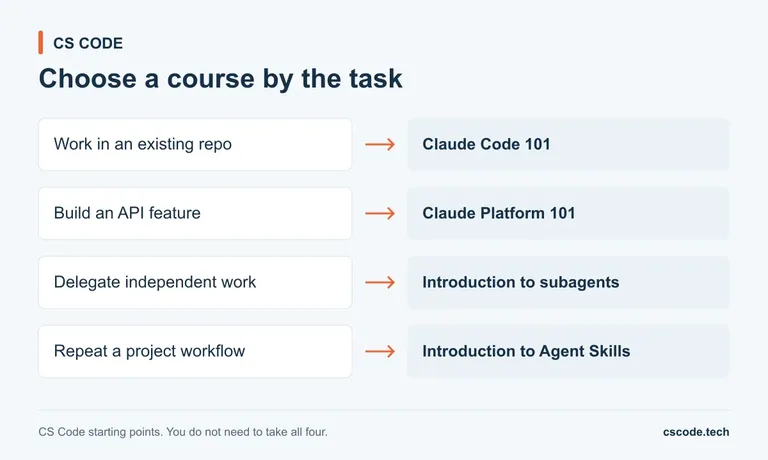
The one I would look at first is Claude Code 101 if you want help working in an existing codebase. If you want to build an AI feature into your own application, start with Claude Platform 101 instead.
These are courses about AI-assisted development. You will get more from them if you can already read code, recognise an error message and use a terminal. They cover a different set of skills from learning your first loops or functions.
What is free, and do you get a certificate?
All four course pages say their course features are free and that they do not award certificates. That is the offer: access to the material, without a completion credential.
This distinction matters because Coursera also promotes free previews and subscription trials. Its August 2025 announcement introduced first-module previews to replace the older audit experience for most courses. A preview is a useful way to inspect a course, but it is limited access.
The four courses below belong to the Anthropic launch announced on October 5. Coursera announced ten free courses across several audiences; these are the four in its developer group. They are recent additions, rather than a fresh launch this week.
The certificate and payment answers are in the FAQ near the bottom of each course page. Read those alongside the syllabus. A general Coursera Plus promotion elsewhere on the page does not describe the access terms of every individual course.
Which course should you start with?
Choose the course that matches something you want to do in a project. Claude Code 101 fits repository work; Claude Platform 101 fits application development. Skills and subagents become useful when you have a repeatable workflow or a task worth splitting up.
If you are completely new to programming, start with a language course first. Princeton's Computer Science: Programming with a Purpose teaches programming fundamentals in Java. Its course page also lists the material as free, without a certificate. It is an established course, separate from the new Anthropic release.
For practice alongside a course, our data structures and algorithms tutorials give you smaller topics to work through. You should be able to explain a function or algorithm before deciding whether an agent has improved it.
1. Claude Code 101 for working in an existing project
Claude Code 101 is the broad introduction. Its four modules cover the coding-agent model, installation, a first prompt and customisation. The syllabus includes context management, project instructions in CLAUDE.md, MCP connections, hooks and custom subagents.
That makes it a sensible starting point if your current workflow is copying code between a chat window and an editor. A repository-aware agent can inspect files and propose changes inside the project, so understanding permissions and reviewing its work become part of the job.
The course lists familiarity with an editor and command line as prerequisites. It also lists a suitable Claude account or API key for using the tool. Reading the lessons and running Claude Code are separate access questions.
A useful practice task is a small bug in a project you understand. Ask the agent to explain the cause, propose a change and identify the relevant tests. Then inspect the diff yourself. Keep the first task small enough that you could fix it without the agent; that gives you a way to judge the result.
2. Claude Platform 101 for adding AI to an application
Claude Platform 101 covers building with Claude through an API. Its five modules move from an initial API call into agent loops, tool use, context management and managed agents.
Look closely at the prerequisites before starting. The examples use the TypeScript SDK with Node and npm. The page recommends comfort reading and writing code, and says an Anthropic Console account, API key and prepaid credit are needed to run the examples.
This is the course I would choose for a developer who wants to add an AI feature to an existing app. A small support-request classifier is a reasonable practice project: give it a few categories, test ambiguous requests, and decide how the application should handle an uncertain answer.
Keep the first version narrow. One input, one useful output and a few tests will teach you more about your application's needs than a large agent with several tools attached from the start.
3. Introduction to subagents for separating independent work
Introduction to subagents is a shorter, focused course. The syllabus covers separate context windows, creating custom subagents with /agents, structured outputs, tool restrictions and situations where delegation is useful.
The practical question is whether a task can finish independently and return something you can check. Reviewing a small change for missing tests is a better first experiment than asking several agents to rewrite the same feature together.
For practice, give a reviewer a specific diff and ask for a short list of findings. Each finding should point to the relevant code and explain a failure case. Compare the result with your own review before you let that workflow influence a real change.
You can leave this course until you have used a coding agent on a few ordinary tasks. Having a working baseline makes it easier to see whether delegation is helping or just adding more output to read.
4. Introduction to Agent Skills for repeated workflows
Introduction to Agent Skills is about packaging instructions you use repeatedly. Its syllabus covers writing a SKILL.md file, descriptions that help a Skill trigger, supporting files, tool access, sharing and troubleshooting.
This is useful when you keep giving the agent the same project-specific explanation. For example, you might want every documentation change to check relative links, use the project's terminology and include a runnable example when it describes a command.
Turn one such routine into a small Skill, then try it on two different changes. Check whether it applies at the right time and leaves unrelated work alone. A long file of broad advice is harder to evaluate than a focused routine with an obvious result.
Skills and subagents solve different workflow problems. Start with the one that matches the work you actually repeat, rather than adding both because the features are available.
Free lessons can still require paid tools
The course enrolment and the software used for practice are separate. Claude Platform 101 explicitly calls for prepaid API credit. Claude Code also needs an appropriate access method; its official quickstart lists the current account options.
Check that requirement before paying for anything. If you already have suitable access, you may be able to use it. If you are still deciding whether the tool fits your work, read the relevant lessons first and choose one small exercise to run.
Students can also check our guide to developer tools and benefits for students. Treat each benefit separately: access to one product does not automatically cover another company's API usage.
How to enrol without confusing a course with a trial
Open the individual course link, sign in to Coursera and read its payment and certificate FAQ. The four course pages linked here currently state that all course features are free and no certificate is awarded.
If a screen offers a paid subscription or trial, check which product you are enrolling in before continuing. The relevant product is the individual course. A subscription promotion or a larger programme can have different terms.
After enrolling, make sure you can reach the course material beyond its opening lesson. If the access offered to your account differs from the course's FAQ, pause and check with Coursera support before starting a paid plan.
For a first pass, choose one course and one small project task. Finish that task, keep the resulting code or notes, and write down what still needs your judgement. That is a more useful outcome than collecting four enrolments and never returning to them.