How to Preserve WordPress URLs and Rank Math SEO When Moving to EmDash
How we kept CS Code's WordPress paths and recovered Rank Math metadata in EmDash, with nested page examples, editor overrides and a practical verification checklist.

To preserve WordPress URLs and Rank Math SEO in EmDash, map each original public URL to its imported entry, carry over the rendered metadata, and verify the HTML your new templates produce before changing DNS.
CS Code needed both parts. The articles imported, but the first frontend added collection prefixes to their addresses. Some Rank Math descriptions also needed a separate fallback. A successful content import was only the start of the SEO checks.
This is the follow-up to our WordPress to EmDash migration guide. It focuses on keeping existing links and metadata, using the routing and SEO approach we implemented on CS Code. The examples reflect our EmDash 1.5 site and documentation checked in November 2026.
1. Save what WordPress actually renders
Before moving anything, make an inventory of the pages you intend to keep. For each URL, save its HTTP status, final address, HTML title, meta description, canonical URL, robots directives and social preview image.
Start with your WordPress sitemap, then add important URLs from Search Console and internal navigation. Include nested tutorial pages, archives and old image links. The sitemap alone will not tell you about every address people still visit.
Keep the raw export too. WordPress custom fields can help recover an explicit description, but a blank field does not prove the live page had no description. The SEO plugin may have generated it from a global template or the article text.
Rank Math supports variables such as %title%, %sep% and %sitename%. Those values depend on WordPress settings and the current entry. Save the final HTML output alongside the stored template. Rank Math's variable reference explains how those substitutions work.
Also export Rank Math's settings under Rank Math SEO → Status & Tools → Import & Export. Include any redirection settings you use. That export preserves configuration for reference; it is not an EmDash import file. Rank Math documents the export options here.
CS Code had no custom Rank Math redirect rules to transfer. Check your own installation rather than assuming the same.
2. Why does keeping the slug still change the URL?
A slug identifies an entry inside the CMS. The public URL also depends on the route that renders it, the collection prefix and any parent path.
Our C interview article kept this slug after import:
most-trending-c-interview-questions-and-answers-in-2023WordPress had served it at the root. A template using /posts/{slug} gave the same content a different address:
Original: /most-trending-c-interview-questions-and-answers-in-2023/
Changed:  /posts/most-trending-c-interview-questions-and-answers-in-2023/
Nested pages need more attention. Our introduction page has the entry slug intro, but its public address is /dsa/intro/. Neither /intro/ nor /pages/intro/ preserves that address.
We recorded the relationship explicitly. Here is a shortened example of our route manifest:
[
  {
    "collection": "posts",
    "slug": "most-trending-c-interview-questions-and-answers-in-2023",
    "path": "/most-trending-c-interview-questions-and-answers-in-2023/"
  },
  {
    "collection": "pages",
    "slug": "intro",
    "path": "/dsa/intro/"
  }
]
Our manifest contains 54 legacy mappings, including entries that later needed special handling. It is a routing inventory, not the site's current published-post count.
3. Make the frontend use the original paths
On CS Code, a server-rendered Astro catch-all route looks up the requested path in that manifest. The match supplies the collection and slug, which the route uses to load the EmDash entry.
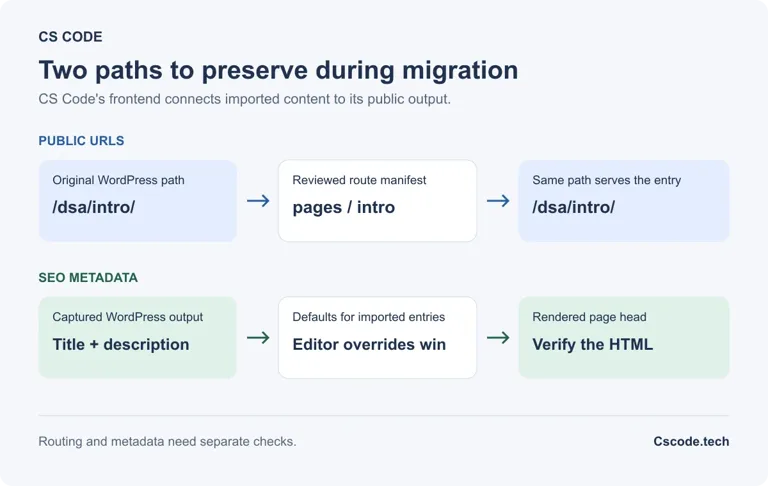
That lets /dsa/intro/ render the pages/intro entry directly. It does not send readers through a redirect to /pages/intro/.
The reverse lookup matters too. Cards, breadcrumbs, navigation and canonical links need to generate the same address. We use one helper for that lookup:
type Route = {
  collection: "posts" | "pages";
  slug: string;
  path: string;
};

// importedRoutes is the reviewed manifest shown above.
const byContent = new Map(
  importedRoutes.map((route: Route) => [
    `${route.collection}/${route.slug}`,
    route.path,
  ]),
);

function getContentPath(collection: "posts" | "pages", slug: string) {
  return byContent.get(`${collection}/${slug}`)
    ?? `/${slug.split("/").map(encodeURIComponent).join("/")}/`;
}
This is the path-generation part of our implementation. You still need a route that resolves the manifest entries, checks publication status and returns a real 404 when content is unavailable. Keep CMS and asset routes outside that content handler.
For new entries, our fallback uses root URLs. Before choosing that convention, check for post/page slug collisions and reserved routes on your site.
Our compatibility redirects send old template aliases such as /posts/... to the retained WordPress path. Internal links already point to the destination, so readers do not need those redirects during normal navigation.
4. Does the EmDash importer preserve Rank Math metadata?
The EmDash Exporter can populate supported Rank Math SEO fields when the relevant import options are enabled. A WXR analysis can report custom metadata without the database import copying every arbitrary field. Check the current WordPress migration documentation for your import method.
In our prelaunch audit, the import had retained 18 article descriptions and no page descriptions. The original export contained 43 explicit Rank Math descriptions across published posts and pages. We recovered those values and compared them with WordPress's rendered metadata.
That was the result of our particular import. It is worth checking a post and a page before running a large migration, especially if they use different SEO settings.
For each imported entry, inspect the destination fields and its SEO panel. Confirm the title, description, indexing choice and sharing image. Then inspect the public HTML. Data sitting in a custom field does not affect the page head until the frontend reads it.
5. Let editors override the preserved SEO values
We kept a small map of preserved titles and descriptions, keyed by collection and slug. Our frontend passes those values to EmDash as defaults. An editor's value in the native SEO panel takes priority.
For example, the preserved data can have this shape:
{
  "pages/intro": {
    "title": "Introduction to Data Structures",
    "description": "An introduction to data structures and their role in organizing and working with data."
  }
}
The wording above is illustrative. Use your own captured WordPress values when building the map. Keep the site-name suffix in one place: if your title helper appends it, remove that suffix from the value you pass in.
Our post and page templates call getSeoMeta() with the resolved public path and those defaults. The layout then renders the returned title and metadata through its EmDash head integration. EmDash's SEO guide explains the SEO panel and page-head rendering requirements.
This arrangement keeps future edits manageable. An administrator can improve a description in EmDash without changing the migration map or asking for a deployment.
Resolve template variables before using them as defaults. For example:
Stored template: %title% %sep% %sitename%
Resolved title:  Introduction to Data Structures | CS Code
Only convert variables whose meaning you know. Our resolver handles a small set of known placeholders and rejects unsupported ones, rather than publishing a partially broken title. For a one-time migration, saving the already rendered WordPress text is often simpler.
Handle indexing rules separately. A serialized WordPress robots value needs conversion into the destination's indexing settings. Do not copy that raw string into a robots meta tag.
Likewise, confirm that a social image resolves to a public image URL. A WordPress attachment ID or a bare imported media ID is not enough for a shared link preview. Keep plugin scores and focus keywords as editorial reference; they do not replace the metadata your page renders.
6. Check redirects, media and heading anchors
Preserving article paths leaves several other kinds of links to test. We checked them separately because each had a different failure mode.
Old image URLs: our content copy moved media out of /wp-content/uploads/. We matched original files to imported media and added permanent redirects for their old paths and known thumbnail variants. Do not guess a new image's identity from its filename alone, especially after an import renames files.
Sitemap and feed addresses: CS Code now uses /sitemap.xml, but old references still pointed to /sitemap_index.xml, /post-sitemap.xml and /page-sitemap.xml. We redirected those endpoints to their equivalents. The old /feed/ address also needed a destination.
Heading fragments: a link ending in #c-interview-questions-and-answers can load the right article yet land at the top. The new heading needs that ID or a compatible anchor. The URL fragment stays in the browser, so a server redirect cannot repair the missing heading target.
Retired pages: one imported code-runner page contained little more than its heading. We retained it as a draft rather than presenting that as a working tool. Its normal public address returns 404 and it stays out of the sitemap.
Use a permanent redirect when an old URL has a clear replacement. Google advises direct redirects to relevant destinations and warns against sending unrelated deleted pages to the homepage. Keep redirects for at least a year when changing URLs. Google's URL-change guidance covers those cases.
7. Verify the output before and after changing DNS
Test important pages on staging, then repeat the checks on the main domain after cutover. A template can work on the temporary hostname while still emitting the wrong canonical or social-image origin.
You can inspect a normal public response without an SEO subscription:
curl -sS -D headers.txt \
  -o page.html \
  'https://cscode.tech/dsa/intro/'
Read the status in headers.txt and inspect the head of page.html. Check the title, description, canonical, robots and social-image tags. Also check X-Robots-Tag in the response headers. Following redirects immediately can hide an unexpected first hop, so inspect that response before testing the full chain.
For our retained tutorial URL, the expected result is a 200 response, the correct tutorial body and a canonical pointing to https://cscode.tech/dsa/intro/. A prefixed alias should redirect to that address. A nonexistent page should return 404 rather than an empty 200 page.
Before retiring WordPress, work through the inventory:
- Retained URLs load the matching content with the intended trailing-slash behaviour.
- Titles and descriptions contain resolved text, with no Rank Math placeholders.
- Canonicals, internal links and sitemap entries agree on the public URLs.
- Public pages have no accidental staging
noindexin HTML or headers. - Old images, downloads and heading links still reach the right targets.
- Existing redirects keep their intended destinations without loops.
- The sitemap includes published, indexable entries and excludes drafts.
- Search Console verification still works, and the current sitemap has been submitted.
Keep WordPress available for rollback until the new deployment passes these checks. Google's hosting migration guide recommends testing the new infrastructure, preserving verification and monitoring traffic during the switch.
Record the cutover date in your own notes. It helps you interpret later Search Console changes alongside indexing reports and server errors. Preserving the URLs removes one source of disruption; it does not establish what caused every traffic change.
Questions that came up during our migration
Do I need a redirect for every WordPress post?
Only when its address changes or you need to support an alternate address. A retained WordPress URL can serve the imported EmDash content directly. Keep redirects for changed routes and existing aliases.
Should I remove an old year from the slug?
Treat a URL change as a separate decision. Our C interview article still has 2023 in its slug even after content updates. A newer headline does not require renaming the URL during a CMS migration.
Do I need Search Console's Change of Address tool?
A CMS or hosting change that retains the domain does not need it. The tool handles domain and subdomain moves; it does not handle path-only changes. See Google's Change of Address requirements.
Will this preserve my rankings?
It preserves the URLs and metadata you verify. Rankings also depend on content and other signals, and Google may need to recrawl the changed site. Use Search Console to monitor the result rather than treating a successful import as an SEO guarantee.